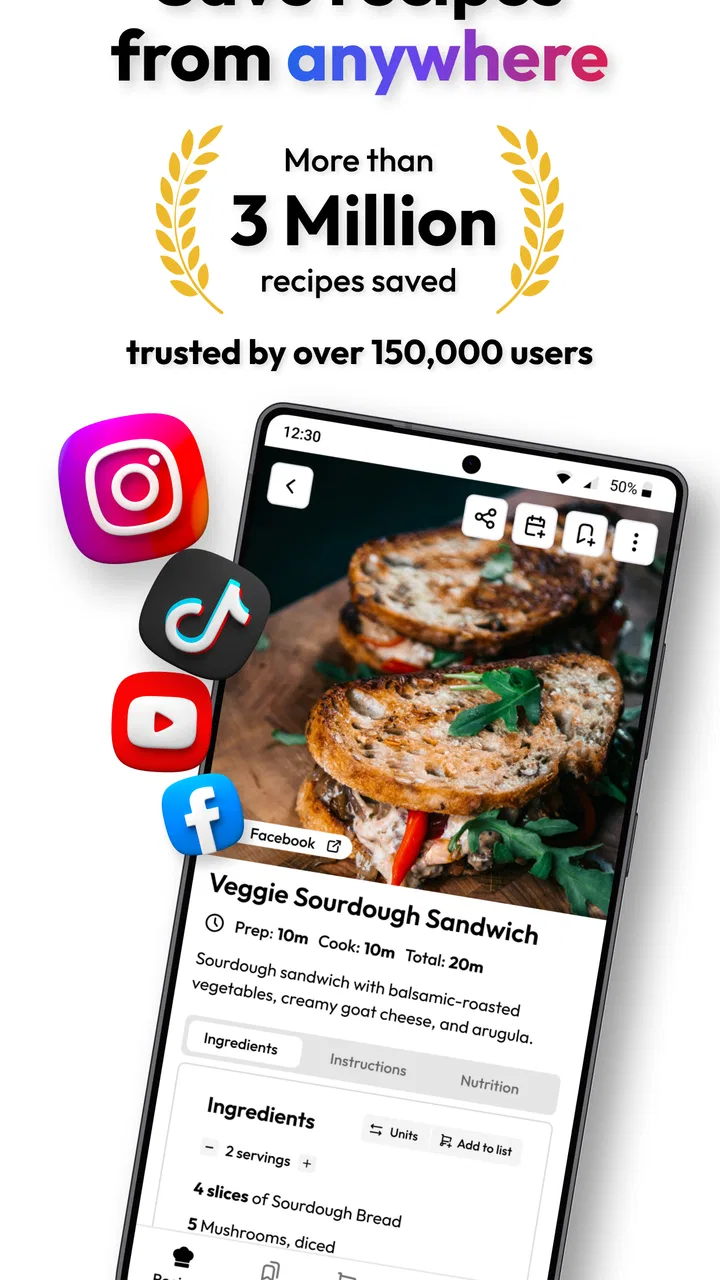
Flavorish | Save Any Recipe
- 4.6
- Rating
- 50.00K
- Installs
- Free
- Price

 Analysis by App-foxy
I started using Flavorish because my recipe collection had become scattered across saved social posts, screenshots, browser tabs, and messages. This Food & Drink app from Flavorish takes a more practical approach: it gives those recipes one place to live, then connects them with shopping lists and everyday meal planning. I found it most useful not as a source of culinary inspiration, but as a way to turn recipes I already discover into something I can actually cook.
That distinction matters. If you want a huge built-in catalog with polished editorial recommendations, this may not replace a traditional recipe platform. If you regularly save recipes from different places and then forget where they went, however, it solves a very specific problem. The app is free to install, rated for Everyone, and has reached over 50 thousand installs. Its average rating is 4.6 from around 1.1 thousand ratings, which fits my impression: the central idea is simple, useful, and easy to understand, even though the experience has a few boundaries that become clearer when more than one person in a household relies on it.
How Flavorish works in a real household
The most convincing test for me was a normal grocery week. One person in the household sends a recipe from a social platform, another has a recipe saved as an image, and I find a third one on a website. Instead of leaving each item in its original location, I can bring them into the same cooking workspace. That makes Flavorish especially appealing when meals are chosen collaboratively but shopping is done by one person.
You May Also Like

 AccuWeather: Weather Radar
AccuWeather Review: A Quick, Clear Forecast for Everyday Decisions
For everyday plans, the best forecast is the one you can understand quickly. AccuWeather makes rain timing, radar, and local conditions easy to act on, with a few trade-offs.

 Hill Climb Racing
Why Hill Climb Racing Still Turns Crashes Into One More Run
A tiny car, a bumpy hill and one more upgrade: Hill Climb Racing keeps resurfacing because its simple chaos makes every near-miss feel personal.

 AliExpress - Shopping App
AliExpress Makes Global Shopping Feel Personal, but Shoppers Bear the Risk
AliExpress turns a global marketplace into a pocket-sized discovery engine. Its reach is useful, its shopping loop compelling, and its trade-offs easy to miss.

 Lords Mobile: Kingdom Wars
Lords Mobile Is a Kingdom-Building Routine, Not a Quick Match
A case-by-case verdict on the building, battles, device demands, and social commitments that make Lords Mobile rewarding for some players and exhausting for others.

 PDF Scanner app - TapScanner
TapScanner Makes Paperwork Easier to Capture, Check, and Share
TapScanner makes scanning with a phone feel less like a rescue operation and more like a dependable step in getting work done. Its capture tools are useful, though not flawless.

 Block Blast!
 Shows How Much a Puzzle Game Can Leave Out
A quiet grid game shows why puzzle players increasingly value instant clarity, repeatable skill and low-pressure play—and where the genre still needs to catch up.
More From Our News Desk
View All News


A shared kitchen creates a different challenge from simply organizing personal bookmarks. The useful question is not only “Can I save this recipe?” but also “Will someone else know what it is, where it came from, and whether the ingredients have already been bought?” Flavorish’s recipe-saving and shopping-list focus helps with that handoff. I can collect the meal ideas first, then use the list as the practical bridge between planning and the supermarket.
My advice is to treat the app as a household reference point rather than assuming it will automatically understand everyone’s routines. Before a busy week begins, I would gather the recipes that are genuinely being considered, check their ingredient details, and then make the shopping list. That small pause prevents an attractive but incomplete saved item from becoming the basis of dinner.
There is also a useful difference between saving and committing. A recipe can be worth keeping for later without belonging on this week’s list. I found it easier to maintain a smaller active group for immediate meals while leaving the rest as a personal archive. That separation keeps the shopping workflow from becoming a dump of every recipe that looked good while scrolling.
Saving recipes from different places
Flavorish is built around the way people actually find food ideas now. A recipe may begin in a short video, arrive as an image in a chat, or sit on a conventional cooking website. Bringing those sources together is more valuable than it sounds because the original platforms are designed for browsing, not necessarily for managing a dinner plan.
Website recipes are the most natural fit for a structured cooking workflow, while images and social posts require more attention from me. When a recipe is presented visually, I do not assume every ingredient, quantity, or instruction has been captured perfectly. I check the saved result against the original before shopping, especially when the dish includes substitutions, several preparation stages, or text embedded in a busy image.
That checking habit is one of the app’s less obvious trade-offs. The convenience of collecting recipes quickly can make the collection feel more complete than it really is. I would rather spend a moment verifying a recipe during planning than discover at the counter that an important ingredient or instruction was missed.
Another practical tip is to save the source while the context is still fresh. If I remember why I wanted a recipe—quick weekday meal, use for leftover vegetables, or something suitable for guests—I can organize my choices more intelligently later. Without that context, a large saved collection can become another form of clutter, just in a nicer interface.
Account boundaries and setup expectations
For a personal setup, the starting point is straightforward: install the free app, save a few recipes, and test the shopping-list workflow before moving everything into it. I would not begin by importing an entire archive. A small trial reveals whether the way Flavorish handles your favorite sources matches your expectations and whether the resulting recipe information is clean enough for your cooking style.
Households should decide early whose collection is being managed. If the app is used by one person on a shared phone or tablet, it is best to think of that collection as belonging to the active account or device user, not as a fully separated family library. I would avoid assuming that different people will automatically have distinct spaces, private favorites, or independent planning areas. The app’s value is in organizing recipes, not in replacing a household account system.
This boundary is important for couples, roommates, and parents who share devices. Before saving hundreds of items, agree on a simple convention: perhaps one person maintains the active weekly list while everyone contributes recipes through a shared routine. That prevents duplicate saves and avoids the awkward situation where one person removes or changes something another person still intended to cook.
The free entry point makes experimentation easy, but the app also includes in-app purchases ranging from $4.99 to $49.99 per item. I would explore the free experience first and decide whether the paid options solve a problem I actually have. A household should be especially deliberate here: one person may value expanded organization while another only needs occasional recipe capture, so paying before everyone understands the workflow could be unnecessary.
Turning a recipe collection into coordination
The shopping-list feature is where Flavorish becomes more than a digital scrapbook. I found it most helpful when the list was prepared around a specific meal plan rather than built continuously from every saved recipe. Selecting the week’s realistic dishes first makes the list easier to trust and reduces the chance of buying ingredients for meals that never happen.
For shared use, I recommend a short coordination routine. One person chooses the recipes, another checks pantry items, and the shopper reviews the final list before leaving. This is not an automated family-management system; it is a clear process built around the tools the app does provide. The benefit comes from giving everyone the same reference point, not from expecting the app to settle household decisions.
I also noticed that shopping lists work best when I interpret them rather than follow them blindly. Recipes often assume that every cook needs every listed item, even when staples are already at home. I remove duplicates, check package sizes, and look for ingredients that can serve more than one meal. Flavorish helps collect the requirements, but the final list still benefits from human judgment.
A less obvious use is coordinating around dietary preferences without pretending that a saved recipe is automatically suitable for everyone. If one person avoids an ingredient, I mark that as a planning question and inspect the recipe before it reaches the shopping stage. The app can gather the information, but it should not be treated as a substitute for reading labels, checking substitutions, or confirming what a household member can safely eat.
For roommates, the same workflow can prevent duplicated purchases. If two people save separate versions of a pasta dish, comparing the recipes before shopping may reveal that they use many of the same ingredients. That can turn several disconnected ideas into one efficient trip, although the app does not remove the need to communicate about who is cooking and when.
Age, trust, and shared-device habits
Flavorish carries an Everyone content rating, which makes its general subject matter approachable for a broad household audience. That does not mean every recipe is appropriate for every person or that a younger user should make food decisions without supervision. Cooking involves heat, sharp tools, allergens, and food-handling choices, so age-appropriate guidance still belongs with the adult using the kitchen.
I would be comfortable letting an older child browse recipe ideas with a parent, particularly when the goal is choosing a weekend meal or learning how a shopping list is assembled. I would not treat the app itself as a safety layer. The useful trust boundary is between the person saving a recipe and the person responsible for checking it before cooking.
This matters even more with recipes captured from social media. A visually appealing post may leave out timings, temperatures, substitutions, or warnings that a carefully edited recipe would explain. I use the saved item as a starting point and verify the original instructions. That is good practice for adults, and it is essential when a younger family member is involved.
Shared devices also create a privacy and ownership question. A saved collection can reveal eating preferences, planned meals, or shopping intentions, so I would keep the device and account arrangement in mind before treating the app as a household noticeboard. If several people use the same device, a simple spoken agreement about what may be saved or altered is more dependable than assuming every user will see the collection in the same way.
Trust also affects recipe quality. A family member may save an idea because it looks interesting, while the person shopping expects a complete, tested dinner plan. I found it helpful to distinguish “inspiration” from “ready to cook.” That label can be informal—a message, a note, or a shared decision—but the distinction prevents a rough social post from being mistaken for a finalized recipe.
Where it beats familiar alternatives
Compared with browser bookmarks, Flavorish is better suited to people who think in meals and ingredients rather than web pages. A bookmark can preserve a destination, but it does not naturally connect a collection of recipes with the shopping stage. Social-platform saves are excellent for discovering food content, yet they are awkward when I need to remember several recipes together and prepare for a store visit.
Compared with a notes app, Flavorish offers a more focused home for recipes. Notes can be flexible, but that flexibility often leads to inconsistent formatting: one recipe is pasted as text, another is a screenshot, and a third is only a title with a link. The app’s purpose makes it easier to keep food-related material together, while the shopping-list function gives the collection a practical next step.
A dedicated recipe website may still be better for someone who wants tested editorial content, extensive search, or a large guided catalog. Flavorish is strongest when the user already finds recipes elsewhere and wants to capture them. I would choose the alternative if discovery, nutritional detail, or structured cooking instruction mattered more to me than collecting recipes from many sources.
There is also a trade-off against a plain shared checklist. A general checklist may be faster for a household that only needs to type groceries and divide chores. Flavorish earns its place when the recipe itself matters—when people need to move from saved inspiration to ingredients without losing the connection between the two.
Limitations I noticed before recommending it
The app cannot make messy source material magically reliable. A screenshot may be incomplete, a social post may use vague measurements, and a website may update after the recipe has been saved. I consider verification part of the workflow, not a flaw unique to one recipe. Still, users expecting every capture to become a perfectly structured cooking card may find the process less automatic than they hoped.
Large collections also need discipline. Saving is so easy that the archive can quickly fill with nearly identical versions of the same dish. I recommend deleting duplicates, keeping only recipes you would realistically cook, and using the shopping list as a temporary planning layer rather than a permanent record of every ingredient ever considered.
The shared-household limitation is more conceptual than technical: Flavorish helps people organize food information, but it does not replace decisions about ownership, timing, dietary responsibility, or kitchen safety. If your main need is assigning chores, tracking separate budgets, or enforcing personal account boundaries, a different household tool will likely serve you better alongside the app.
Version 4.6.1 is the version I associate with the current experience, and the minimum operating-system requirement is Android 8.0. That makes it accessible on many older Android devices, though anyone planning to use an old shared phone should still check how comfortably recipes and images can be viewed on its screen. A small display can make ingredient checking and cooking guidance less pleasant, even when the organizational idea works well.
Who should install it
I would recommend Flavorish to anyone whose recipe life is spread across social media, images, and websites. It is particularly useful for a household where one person discovers meals and another handles shopping, because it creates a common place to move from inspiration to action. It also suits cooks who want to preserve their own discoveries instead of starting over inside a single recipe service.
I would be more cautious if you want a fully managed family food platform. People who need separate profiles, detailed permissions, automatic dietary screening, or chore assignments should not assume this app covers those needs. Likewise, if you only cook from a handful of printed recipes, a simple note or paper list may be quicker and less effort.
The best results come from using it selectively. Save recipes from places you genuinely use, review captured details, choose a realistic set for the week, and clean the shopping list before buying. Those steps turn the app from a storage bin into a dependable planning habit.
After testing it in that way, I see Flavorish as a focused organizer rather than an all-purpose cooking companion. Its strongest feature is the connection between scattered recipe discoveries and a usable shopping list. Its weakest point is the amount of judgment still required when sources are informal or when several people share responsibility.
For a personal cook or a coordinated household, that balance is reasonable. The app is free to start, suitable for Everyone, and developed by Flavorish, with paid items available for users who decide the extra options fit their needs. I would recommend trying it with a small group of real recipes first. If that trial makes your next grocery trip clearer, it is doing exactly the job it is meant to do; if your household needs strict separation or broader meal-management tools, I would keep looking.
My household verdict: Flavorish is worth using when the problem is scattered recipe inspiration and uncoordinated shopping, not when the problem is family administration. I like it because it respects the way recipes are actually found today while still pointing toward a practical dinner. Just keep the account boundaries clear, verify captured instructions, and let people agree on the plan before the list reaches the store.
FAQs for Flavorish | Save Any Recipe
01What is Flavorish | Save Any Recipe and what can I use it for?
Flavorish | Save Any Recipe is designed to help you collect, organize, and revisit recipes from different sources in one convenient place. You can save recipes you discover online, keep personal cooking notes, and build a more manageable recipe library instead of relying on scattered browser bookmarks, screenshots, or social media posts. It is particularly useful for home cooks who want quick access to favorite meals while planning what to prepare.
02Can Flavorish save recipes from websites and social media?
The app is intended for saving recipes you find across the internet, making it easier to preserve useful cooking ideas for later. Depending on the source and the way a recipe is published, the amount of information imported may vary. Some pages may transfer ingredients and instructions neatly, while others might require you to review or edit the saved entry. It is worth checking the recipe after saving to ensure all details were captured correctly.
03Can I organize my saved recipes in Flavorish?
Yes, organization is one of the main reasons to use Flavorish. Saved recipes can be kept in a personal collection, allowing you to find dishes more easily than when they are spread across multiple websites or apps. Users should still take a little time to create a consistent system, such as grouping recipes by meal type, cuisine, occasion, or dietary preference. A well-organized library becomes increasingly valuable as more recipes are added.
04Does Flavorish work offline, and can I access recipes without an internet connection?
Offline access may depend on how a recipe was saved and which app features are available in the current version. Recipes that have been fully stored inside the app may remain accessible when you are away from Wi-Fi or mobile data, but externally linked content could require an internet connection. Before traveling or cooking somewhere with poor reception, open important recipes in advance and confirm that their ingredients and instructions are available.
05Is Flavorish free to download, and are there any in-app purchases or privacy concerns?
Flavorish may be available to download at no initial cost, but users should check the current Google Play Store or Apple App Store listing for subscription options, premium tools, advertisements, and regional pricing. Because the app can involve saved recipes, account information, or imported links, reviewing its privacy policy and requested permissions is also recommended. Only grant access that seems necessary, and keep the application updated for security and performance improvements.
Pros
- Saves recipes from websites
- social media
- and other sources
- Keeps ingredients and cooking steps organized in one place
- Useful search tools make saved recipes easy to find
- Supports meal planning and helps organize upcoming dishes
- Clean interface is approachable for everyday home cooks
Cons
- Some imported recipes may need manual cleanup or corrections
- Advanced features may require a paid subscription
- Recipe-saving support can vary between websites and platforms
- Limited offline access may affect cooking without internet
- Large recipe collections may take time to organize effectively

Flavorish | Save Any Recipe
Gallery